Shein Free Trial Center: Your Simple Step-by-Step Guide
Your easy guide to the Shein Free Trial Center: product categories, how to apply, tracking requests, sending trial reports and fixing rejected reviews.
Advertisement
With the Free Trial Center, you can request products that are part of specific campaigns. But picking an item and sending your request? That's just step one.
Categories You Can Explore









The program's supplier decides which products appear and when.
Joining in doesn't mean you'll be approved.
Every request is made and reviewed directly in the Shein app, and Shein alone decides who is picked. If you're selected, you still have to test the item and post a review on time.
Sequovera is not affiliated with Shein. We don't collect your data or process any application — we only explain how the program works. Knowing each stage before you start helps you avoid late reviews and other issues.
Find the area made just for trials
Start by logging in and locating the Free Trial Center. In the app, the path is Profile → More Services → Other Services → Free Trial Center. Once you're there, you'll see every product with an open campaign right now.
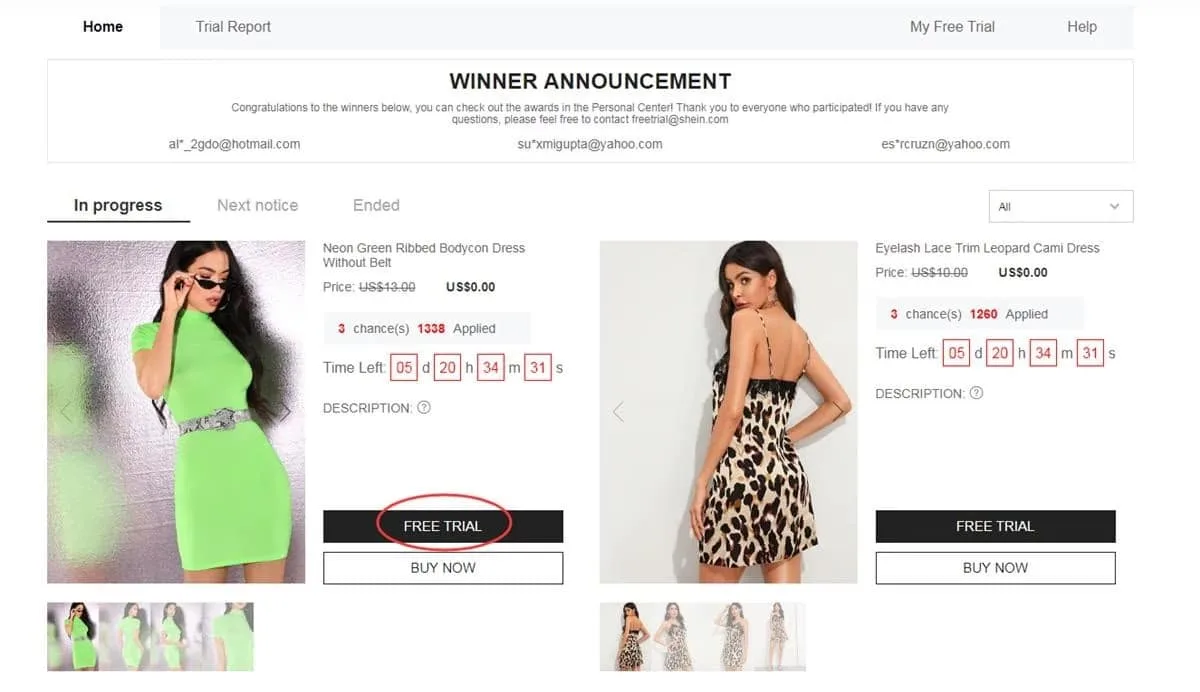
Head to this area to see which campaigns are currently open
Pick the items you'd like to try
You get up to 3 applications per week. Any you don't use in this cycle won't carry over. Before you pick a product, double-check the size. Also make sure your saved address is in the region your store serves.
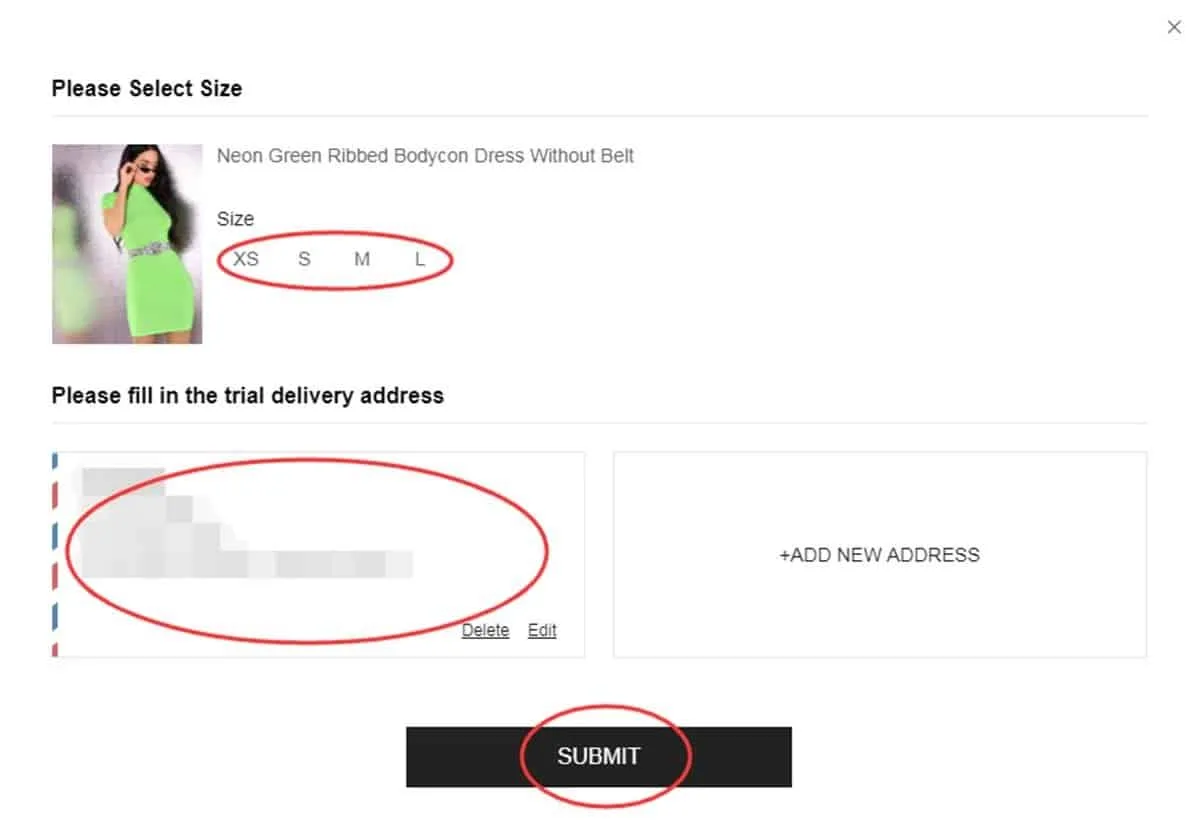
Check your item and delivery details before you send the request
Keep an eye on your application
Once you've applied, follow it under “My Free Trial” or “My Applications”. Expect the result in about a week. An “Approved” status means you got a spot in that trial. “Failed” means your request wasn't picked this time.
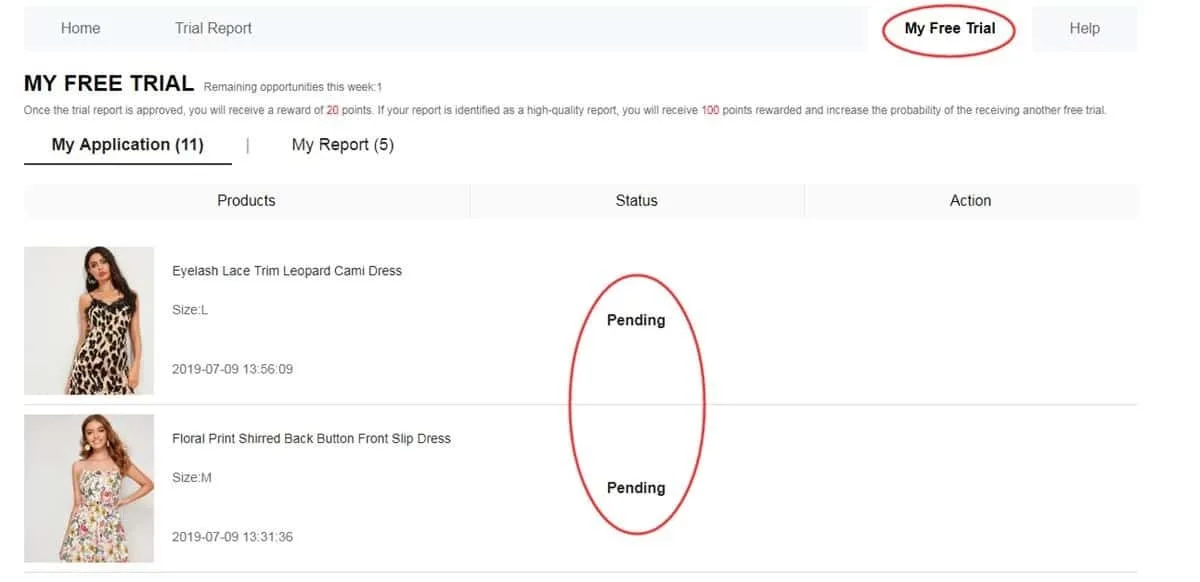
Check your history to find out which requests made it to the next step
Test the item once it arrives
When your approved product shows up, use it before you write anything. Pay attention to the material, finish, comfort, size, look and general quality. Base your review on what you actually experienced, add photos you took and send it within up to 10 days.
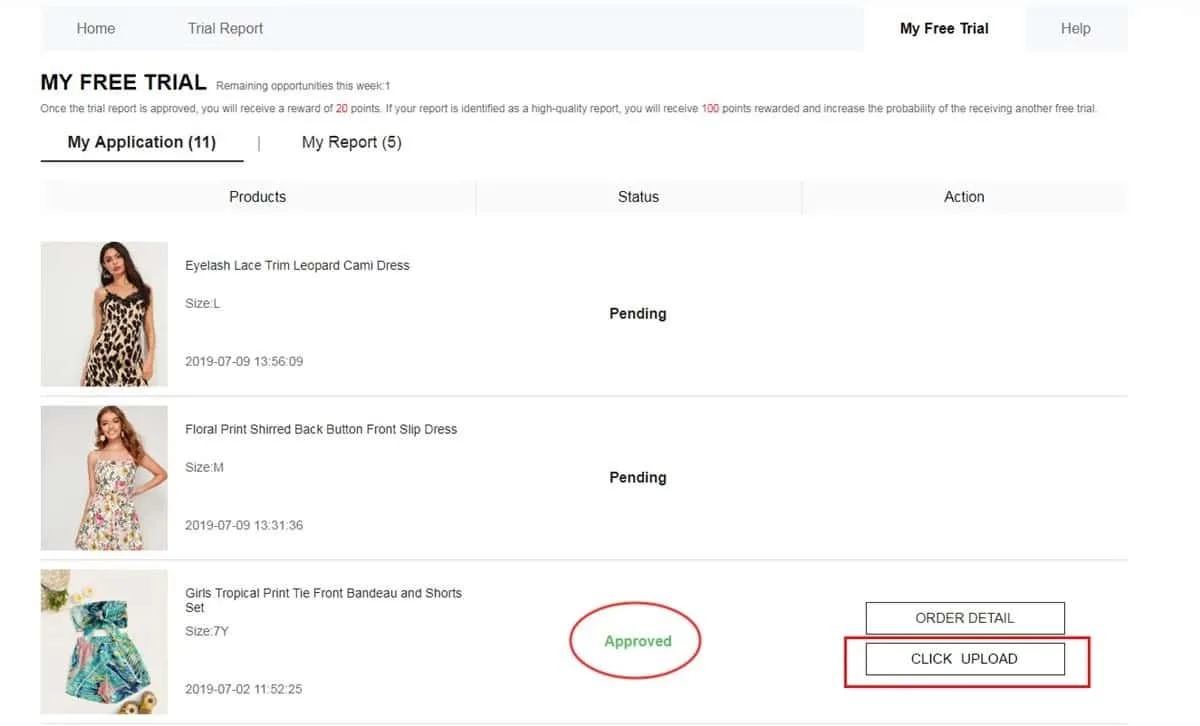
Post a detailed review with your own photos of the item
See if your report was accepted
Once your review is done, open My Report to see how it went. An approved report usually gives you 20 points. If it's also marked as a “High-Quality Report”, you may get 100 more. These points don't mean you'll be approved automatically next time.
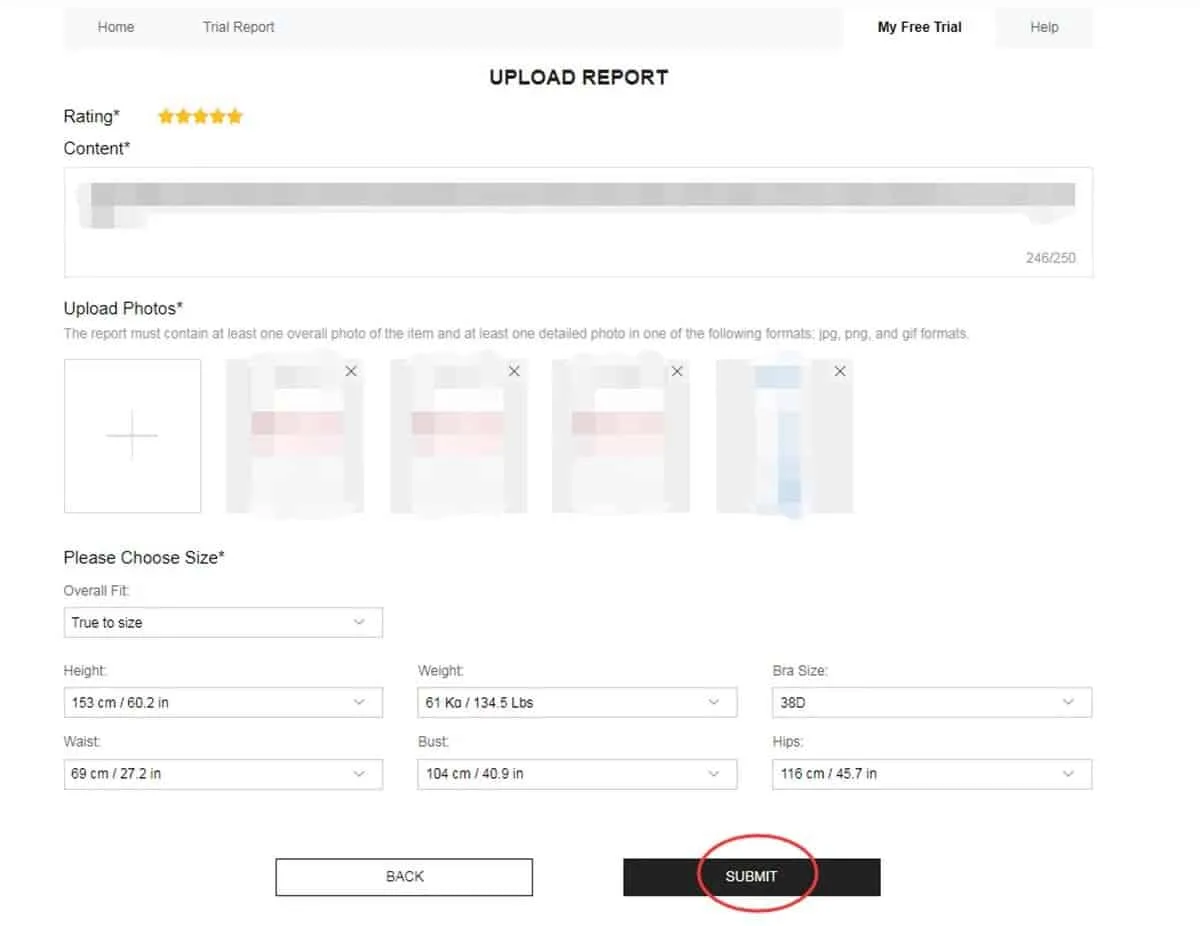
In this section, you can see your review outcome and the points that come with it
Fix your report when you get another chance
Some reviews don't pass on the first check. If yours shows Failed, look for the Rewrite option. If you see it, edit your text, add useful details and swap out photos that are dark, blurry or don't show the item clearly.
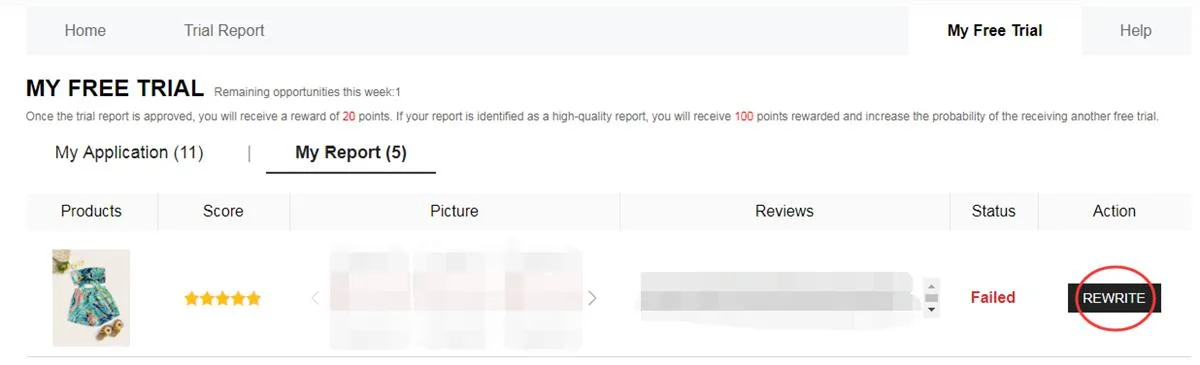
If it's turned on, Rewrite lets you fix your content and send it in again
What goes on between your request and your review?
You start by browsing the open campaigns and picking products you like. The catalog changes over time, so what you see this week may not be there next round.
Next, your request is reviewed. At this stage, you don't have a confirmed product yet. Each application depends on the result that appears in your dashboard later on.
If you're approved, the item ships to the address you gave when you signed up. Once it arrives, it's time to use it and evaluate it, paying attention to its different features.
Finally, you send in your report. Hitting the deadline matters, but so does writing helpful content in your own words, with pictures that really show what you got.
What kinds of products can show up in campaigns?
The lineup shifts with what's available each period. Still, you may spot several types of products in the catalog:
- Apparel: dresses, tees, blouses, jeans, activewear, coats and other clothing.
- Beauty and self-care: makeup, skincare and products for your everyday self-care routine.
- Accessories: bags, footwear, fashion accessories, jewelry and other style items.
- Home and storage: kitchen tools, decor pieces, organizers and items for any room.
Getting turned down before doesn't mean your next requests will end the same way.
Each new round is also a chance to check your details and apply with everything correct.
How do you make a review more useful?
A good report says more than “I liked it” or “I didn't”. Try to capture real details from your time with the product:
• Say what you enjoyed, and point out anything that could be better.
• Talk about size, material, finish, comfort and how it really looks.
• Add photos you took yourself, with good light and angles that show the item well.
• Share notes that would help someone thinking about buying the same thing.
Slip-ups that can hurt your chances
You can dodge many issues with a quick check before you finish each step:
❌ Leaving key profile details blank or out of date.
❌ Saving a delivery address outside the region of the store you picked.
❌ Confirming an item without checking the size and other details shown.
❌ Sending a shallow report that doesn't explain how the item worked for you.
❌ Uploading poor photos, or photos where the product is hard to see.
❌ Going past the deadline of up to 10 days to send your review.
❌ Skipping the chance to fix your report when Rewrite is turned on.
❌ Giving details that don't match the real information needed to join.
The main facts about this program
• You can send up to 3 applications per week. Leftover choices don't move to the next cycle.
• Your address has to match the country or region of the store you applied through.
• The program pays for standard shipping. Customs rules and any fees can vary based on where it's shipped.
• Once your item arrives, you have a fixed window to finish and send the required report.
• If a review is rejected, you may get the Rewrite option to make changes before it's checked again.
• Giving false details or misusing accounts can lead to limits or a block from future trials.
• If you join the trials, you're responsible for following the steps properly and finishing your reports.
Questions you might have
Does it cost you anything to send an application?
No. You don't pay anything to request a product in the Free Trial Center. Keep in mind that applying doesn't mean you'll be picked.
How many requests can you send each week?
The program lets you request up to 3 products in each weekly cycle. Any options you don't use won't roll over to next week.
If you're rejected, can you still join again?
Yes. A request that wasn't picked only counts for that one opportunity. You can keep watching new campaigns and apply again whenever products are open.
How can you tell if your review needs fixing?
Open the My Report section. If your review says Failed and you see the Rewrite option, you can edit it and send it again.
Want a closer look at every step?
Learn how to move around the Free Trial Center, follow your applications and write a proper review if you're picked.


